 Install with Gale
🔥 EMBER TOGETHER 🔥
An OdinPlus mod for Emberville. Use Gale Mod Manager to get the latest updates from OdinPlus!
ABOUT:
EmberTogether is an unofficial co-op mod for the Emberville demo. It is built as one clean mod, not a mod pack: a single mod file plus two small helper libraries next to it. Nothing else to collect, nothing to delete when you update. Not made or supported by Cygnus Cross.
1.1 - REVIVES, SHARED XP AND PINGS: one player hosts, friends join, and you fight, loot and explore the same level together. The host's game decides what happens in the world; guests see it and take part.
WHAT YOU CAN DO NOW:
- Join through Steam: the Insert window lists your Steam friends with their avatars and what they are doing. One click invites a friend (hosting starts by itself) or joins one who is hosting. No IP addresses, no router settings.
- Or join by IP: host on a UDP port and join by address (LAN, VPN tools, or a forwarded port).
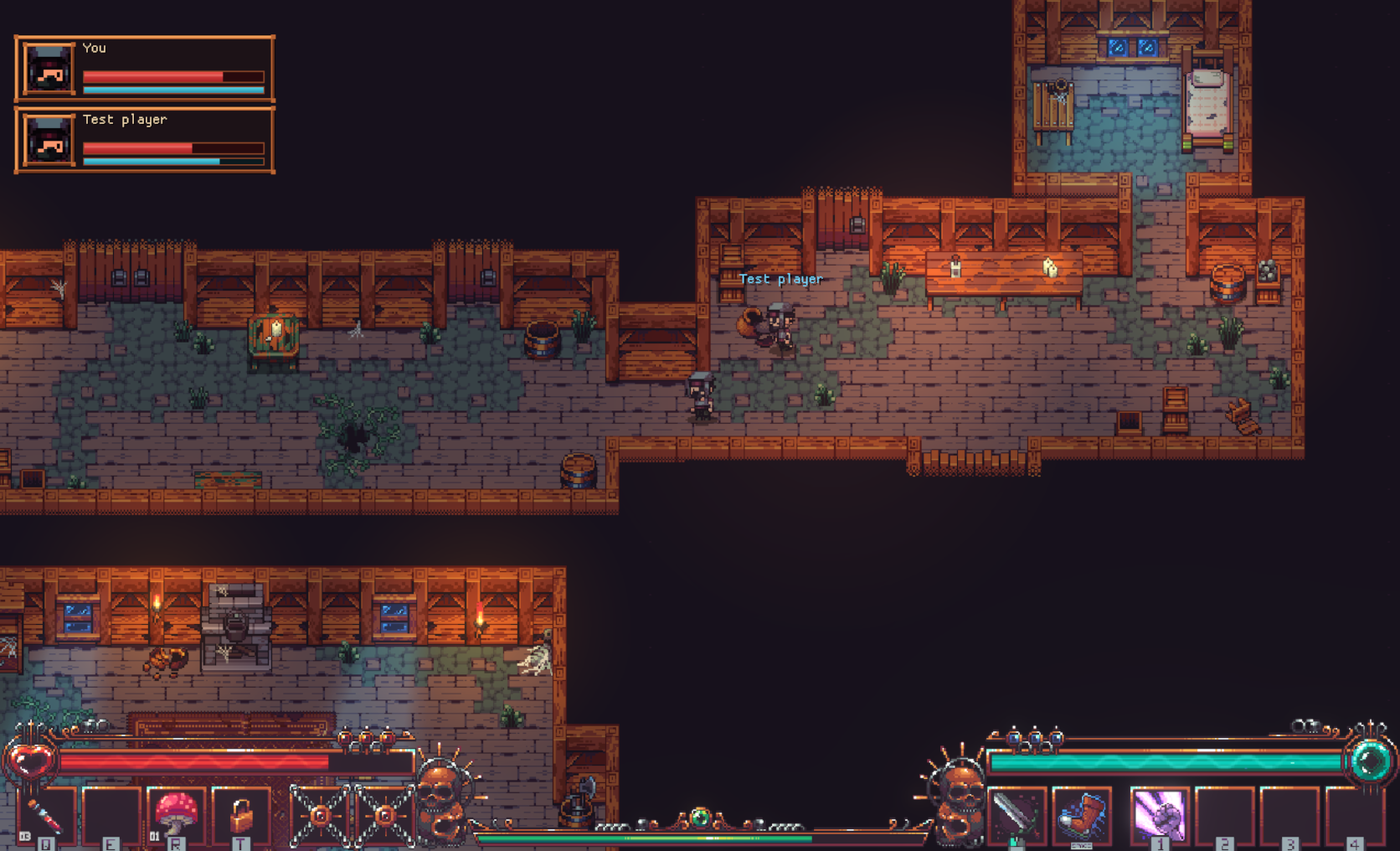
- See each other: other players appear in your world with a name above their head, walk with their own animation, and wear their own hair, face, gear and colours. You also see their swings, shots, dodges and gathering animations, and their projectiles in flight (for ones your game has loaded). Players in a different area are hidden until you meet.
- One shared fight: enemies, loot and breakable objects are the host's. Guests see the host's enemies move and attack, hit them (the host applies the damage), see the same drops land, ask the host to pick them up (first come, first served), and see boxes and barrels break when anyone smashes them.
- Enemies get hurt, and hurt back: enemies chase whoever is closest, shoot at you, and flinch and fall when hit, with their health bars, hit flashes and projectiles showing for everyone. Your own attacks never hurt your friends.
- A shared level: trees, rocks and herbs, levers and switches, doors, lamps and torches, and the time of day are kept in step. A friend who joins late catches up on what has already been broken or opened.
- The host's story is everyone's story: quest progress and world flags (a quest giver defeated, a cave door opened, ...) are sent from the host to the guests, so a friend who joins late is not stuck behind something you already did. Story objects the game remembers (barricades, an NPC who walks away) follow the host too. If a guest moves the story on by themselves (talks to someone, hands something in), that progress goes to the host - never backwards.
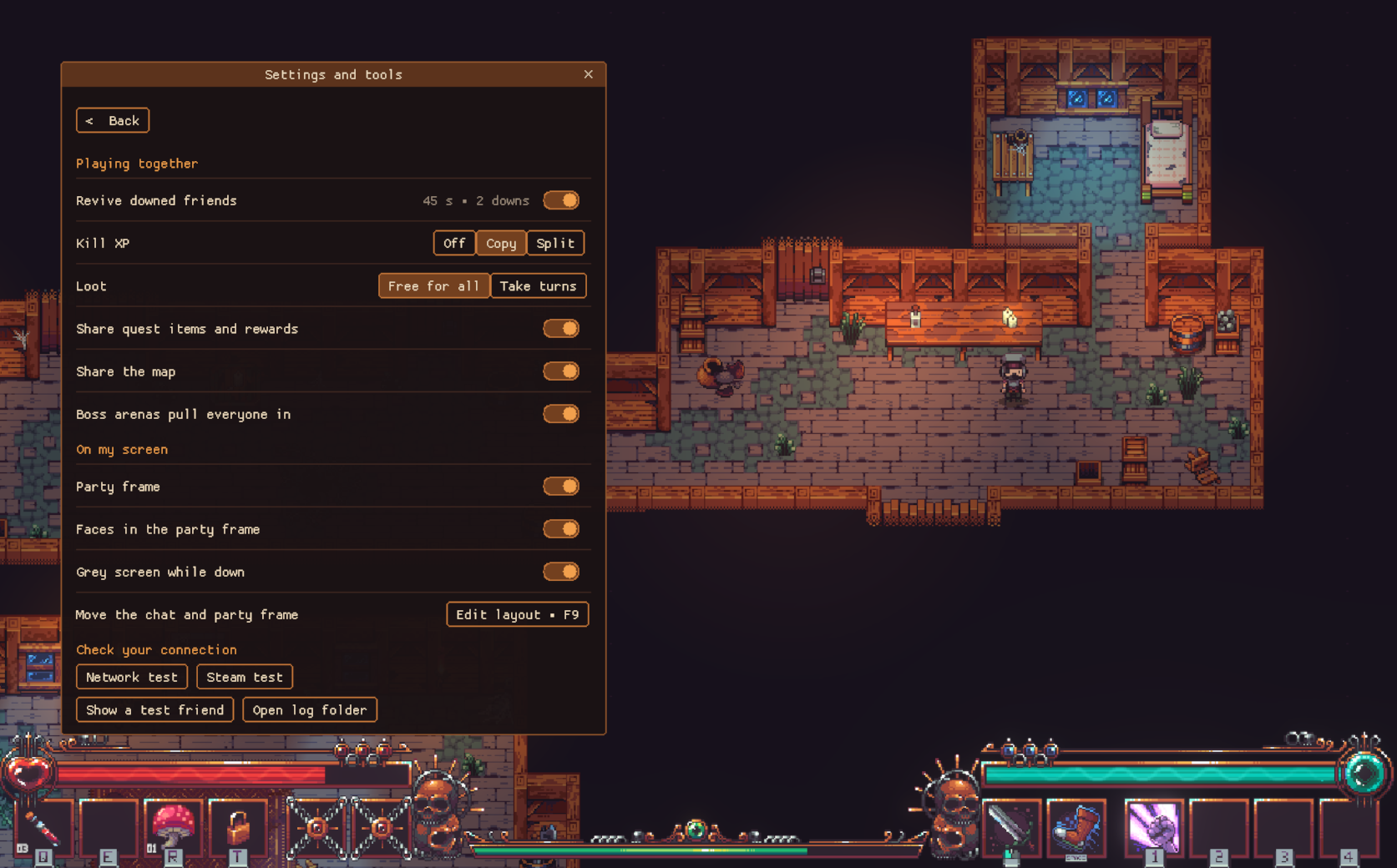
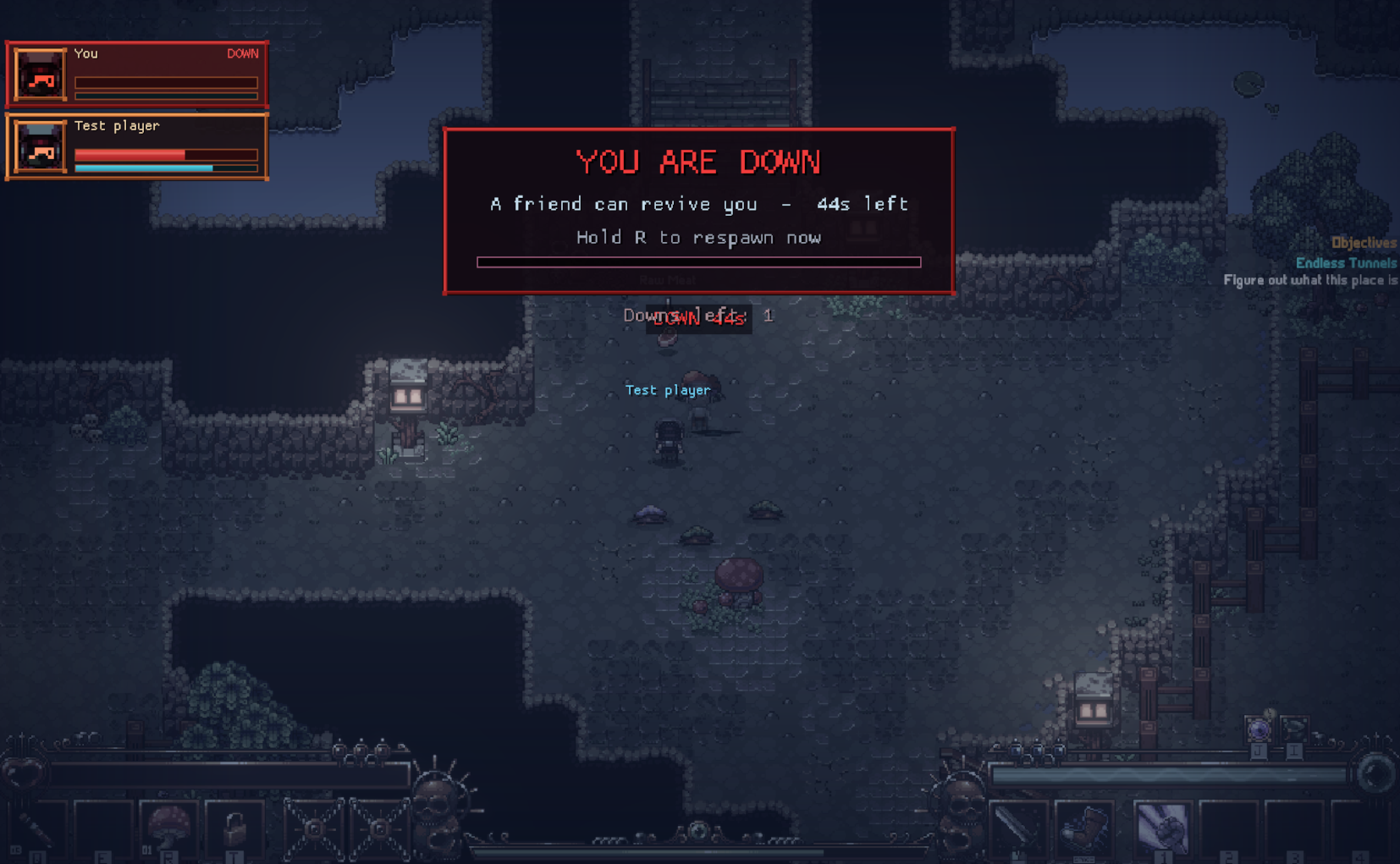
- Party frame: a small list at the side of the screen shows everyone in the session with a live picture of their face (hair, head and face as they look right now), a coloured name tag, a health bar, and DOWN when someone is lying on the ground. Press F9 (or use the button in the Insert window) to move the party frame and the chat with the mouse: drag them where you want them, use the mouse wheel to make them bigger or smaller, then press F9 or Esc. Your layout is saved. You can also set it all in the config.
- Revive your friends: when you die and a friend is still standing, you lie down for 45 seconds instead of respawning. They stand next to you and hold F for 3 seconds to bring you back with 40% health, with the game's own "appear" effect. While you are down you are a see-through ghost, your screen turns grey and cold, a red DOWN with a timer floats above you (and above any friend who is down), and a box shows how long is left. You can give up waiting and respawn right away by holding R. After two downs in one life the next fall is a real death, so a fight cannot be won by endless revives (all of this is adjustable). If nobody gets to you in time, or nobody is left standing, you respawn as usual (right away, without waiting out the timer).
- Shared XP: when the host's game kills an enemy, nearby friends get the XP too (everyone gets the full amount, or the amount is split - your choice).
- Loot rules: by default anyone can grab any drop. The host can switch to round robin, where each new drop is reserved for the next player in turn for a few seconds.
- Pings: press G to drop a coloured marker where your mouse is. Everyone in the area sees it with your name, and an arrow at the screen edge if it is out of view. It fades after 10 seconds.
- Chat in game: press Enter to type, Enter again to send, Esc to cancel. Messages appear at the bottom-left and fade away. Joins and leaves are shown too.
- Version check: players on a different version are turned away with a clear message.
- Built-in self-tests: check that networking and Steam work on your PC without needing anyone else.
GOOD TO KNOW:
- The host runs the world (enemies, loot, the level). Guests keep their own character, inventory and save.
- Guests get their own co-op save. When you join someone, your game switches to a separate world save just for that host ("Co-op: Name"), and your own worlds are never written to while you are joined. Next time you join the same host, the same co-op world comes back. Your character (level, items) stays your character. You are asked before the first join; turn the question or the whole feature off in Coop in the config.
- The host's rules count. While you are joined, revive, kill XP, loot, story, quest items, the map and boss arenas follow the host's settings. Your own settings are not changed, and come back when you leave.
- Guests follow the host's quests and world flags (turn off with Sync / HostStory). Shops and chests are still each player's own, but quest items are shared.
- Playing in different areas is fine; you only see each other, and the host's enemies, when you are in the same area.
- Press Insert, open Settings and use Show a test friend to try things out alone: a pretend friend follows you and fights nearby enemies.
HOW TO PLAY TOGETHER:
- Everyone installs the same version, and starts the game through Steam.
- Press Insert in game to open the EmberTogether window.
- The host clicks Invite next to a friend's name: it starts hosting through Steam and sends the invite in one click (or click Host game first and let friends use Join Game on your name in Steam).
- Friends can also press Join next to a hosting friend in the window. A friend who is not on Steam with you can use Direct: paste the host's invite code (their Steam ID, from Copy invite code) or an IP address.
- Tick Always host when I play and your friends can join you whenever you are in a world.
- Joining from the main menu: accept the invite (or start the game from it). Your character list opens by itself: choose your character and you go straight into the host's world.
LANGUAGES:
EmberTogether follows the language you pick in the game's own options: English, German, French, Spanish and Portuguese (Brazil) are built in. Chinese, Japanese and Korean show English for now.
The translations are built into EmberTogether.dll: there are no extra files to install or keep track of. Want to help translate, or spotted a wrong word? Tell us on Discord. Translators can test their work by putting a file named EmberTogether.<code>.json next to the mod (codes: en, de, fr, es, pt-BR, zh-CN, zh-TW, ja-JP, ko-KR); it is used instead of the built-in words. The mod's menu font only has Western European letters for now, so Chinese, Japanese and Korean cannot be shown yet.
FILES:
EmberTogether.dll- the mod (networking, menu, Steam code and translations are built in).cimgui.dll- the menu engine (Dear ImGui).steam_api64.dll- Valve's file that links to your Steam client.
CONFIGURATION:
Run the game once, then edit BepInEx/config/OdinPlus.EmberTogether.cfg. The Revive, Xp, Loot and Sync settings and the sharing switches in Coop are the host's: guests use the host's values while joined.
- Network / Port (9060) - UDP port used to host and join by IP.
- Overlay / MenuKey (Insert) - opens and closes the window.
- Party / Enabled (true), ShowSelf (true), Portraits (true), Position (LeftCenter, TopLeft, BottomLeft, TopRight, RightCenter, BottomRight), OffsetX, OffsetY, Scale (1) - the party frame.
- Layout / Key (F9) - press to drag the chat and party frame around with the mouse.
- Coop / SeparateSave (true), WarnOnJoin (true) - the separate co-op save for guests, and the question before joining.
- Coop / HostAutomatically (false) - host through Steam whenever you are in a world, so friends can always join.
- Coop / CarryWorld (true) - joining sends you the host's world, which replaces your co-op world; JoinTeleport (true) takes you next to the host; ShareKeyItems (true) shares quest items; QuestRewardsForAll (true) gives everyone a finished quest's rewards.
- Coop / ShareArenas (true) - boss arenas, room events and waves are shared (the host runs them); ShareMap (true) - the party shares uncovered map.
- Sync / HostStory (true) - guests follow the host's quest progress and world flags.
- Revive / Enabled (true), Key (F), DownedSeconds (45), HoldSeconds (3), Range (2.5), HealthPercent (40) - how being down and reviving work.
- Revive / MaxDowns (2) - downs per life before the next fall is a real death (0 = no limit). AllowRespawn (true), RespawnKey (R), RespawnHoldSeconds (1.5) - respawn right away while down. DeathView (true), DeathViewStrength (0.8) - the grey, cold screen while down.
- Xp / Mode (Copy, Split or Off), Range (60) - who shares kill XP.
- Loot / Rule (FreeForAll or RoundRobin), ReserveSeconds (6) - host setting for how drops are shared.
- Ping / Key (G), Seconds (10), AtCursor (true) - map pings.
- Chat / ChatKey (Enter), ShowSeconds (10), FontSize (18), BottomMargin (170) - how chat behaves and where it sits.
INSTALLATION:
- Install BepInEx 5 (Mono) for Emberville, on Windows.
- Place the EmberTogether folder directly into:
BepInEx/plugins/, keeping all the files together. - Start the game through Steam while logged in. Everyone playing together needs the same version.
CREDITS:
Built on BepInEx (LGPL-2.1), HarmonyX (MIT), LiteNetLib (MIT), Dear ImGui / cimgui / ImGui.NET (MIT) and Steamworks.NET (MIT). Steam is a trademark of Valve Corporation.
DISTRIBUTION:
Feel free to include this in your modpacks! Just don't recompile and claim the code as your own. Special thanks to the OdinPlus Team for their tireless work.
SHOW YOUR SUPPORT:
Click to BuyMeACoffee:

QUESTIONS?
